
NDepend review
Lately I have spent a bit of time with NDepend, who contacted me if I wanted a free license, in exchange for a blogpost. This was actually great timing on their part, as I was already thinking about giving it another go. Being completely honest I tried NDepend some years ago, and at the time I simply didn't know where to start and where I would get the most value from using such a tool. So back then I pretty much wrote it off, but have again and again heard good things from other developers who are using it.
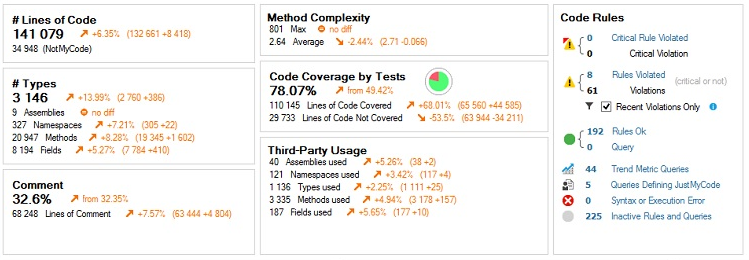
My first thought when I ran NDepend this time around was that a lot had changed. The first thing that met me was a wizard for analysing a project, so I pointed it at my current project. This was the point I got derailed the first time I tried NDepend, because I remember being met by the code metric view which does look kind of scary - especially being new to a tool like this. Now however I was met by a dashboard, that is still complex, but a vast improvement since it gives a pretty good idea of some of the power that NDepend provides. I still can't help think that the tool could gain a lot by providing simpler guides through some key usecases though.
After digging around a little I was really impressed with all the data suddently at my disposal. Number of types, methods, comments, Lines of code and calculations of method complexity (cyclomatic complexity), just to name a few. Along with the raw numbers I saw a (long) list of warnings. Clicking each of those got a good description of best practices that were broken. This is another thing I am often sceptical about - although static analysis is valuable it is also often missing the points. Although I didn't agree with all warnings, most seem resonable, and helped me either validate or dismiss my gut feeling about where parts of the projects complexity is comming from.
Looking around I quickly saw that the build in code rules were described in a LINQ like query language called CQLinq (Code Query LINQ). So this gives me every chance to modify them as I want to. With samples in place for everything from "too many arguments/fields/private variables" to "poor cohesion", "method is too big" and metrics for testcoverage I really didn't even need documentation to get started. Not saying that documentation won't be occationally, but being male I do like not absolutely needing it :)
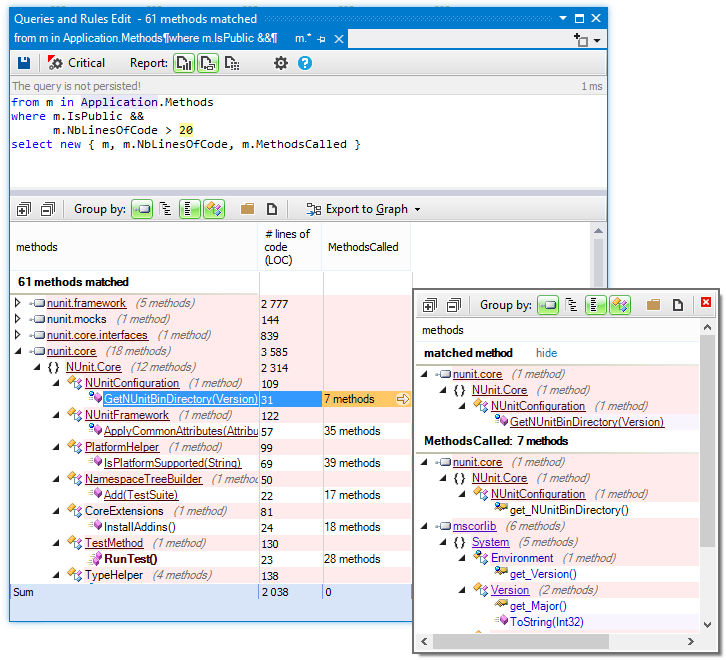
In the exact same language you can also express queries and have the results show up as a treeview, that allows you to drill down and eventually open the actual code in Visual Studio. Lets look at one of the included samples. Something as seemingly difficult as querying for cohesion between namespaces requires no more code than this:
let abstractNamespaces = JustMyCode.Namespaces.Where(
n => n.ChildTypes.Where(t => !t.IsInterface && !t.IsEnumeration && !t.IsDelegate).Count() == 0
).ToHashSet()
let concreteNamespaces = JustMyCode.Namespaces.Except(abstractNamespaces).ToHashSet()
from n in concreteNamespaces
let namespacesUsed = n.NamespacesUsed.ExceptThirdParty()
let concreteNamespacesUsed = namespacesUsed.Except(abstractNamespaces)
let abstractNamespacesUsed = namespacesUsed.Except(concreteNamespaces)
select new { n, concreteNamespacesUsed , abstractNamespacesUsed }
This is nothing short of beautiful - short and to the point. It feels like LINQ with some powerfull extention methods – such as ToHashSet() and .ExceptThirdPardy().
All in all NDepend is vast and powerfull. This is both its glory and its downfall, because you really can get lost at times, so it is nice to see how much it has grown in that reguard. Writing about it all would certainly require me to write a book, which there are pleanty of people who would do a better job at. So I will leave it at recommending that you dig in and give it a chance.